Introduction & Background
Earlier, I published a tutorial on How to Add llms.txt to Squarespace. Since then, Squarespace introduced native support for llms.txt on Squarespace 7.1 sites. However, native support is still lacking on Squarespace 7.0, and site owners have zero control over custom HTTP response headers, markdown content negotiation, or Content-Signal declarations.
Honestly, the actual business utility of llms.txt remains controversial in the SEO and web dev community. Is it genuinely driving AI citations, or is it just another trendy file crawlers ignore? To find out, I set up a live experiment on Beyondspace Studio to test how AI bots and scrapers interact with llms.txt, robots.txt, and sitemap.xml under real-world conditions.
In this post, I will walk through how I used Cloudflare Workers to proxy Squarespace’s native robots.txt and sitemap.xml, serve a custom /llms.txt, and track AI crawler activity.
The proxy architecture: why Cloudflare?
If you have ever set up multilingual DNS routing on Squarespace using Weglot, you are already familiar with edge proxying. By routing traffic through Cloudflare, Cloudflare sits in front of Squarespace servers, allowing us to inspect, modify, or inject specific headers and routes while leaving the rest of the site untouched.
I previously wrote about this edge architecture in my guides on connecting Namecheap domains to Cloudflare, linking Cloudflare-connected domains to Squarespace, and why Cloudflare Workers are ideal for Squarespace sitemaps.
Important caution & trade-offs notice
Before diving into the technical setup, a few important caveats from my live testing:
Traffic interception risks: Intercepting and modifying Squarespace traffic at the Cloudflare layer can occasionally trigger unexpected behavior. During my usage of Cloudflare Workers in 2024, the connection dropped temporarily (SSL handshake failed code 525) thanks to Christine of Colladorada for giving me a heads up! Fortunately, the issue resolved itself, but it highlights the need for caution.
DNS Migration downtime: Expect brief DNS propagation delays when transferring DNS management to Cloudflare.
Customer accounts anomaly: On my site, the native Squarespace Customer Accounts feature appeared to stop functioning properly after setting up the proxy. If your business relies heavily on native member areas or customer accounts, test thoroughly.
Step-by-Step implementation
Step 1: Cloudflare Prerequisites
You need connect your domain name to Cloudflare first, ensure these settings are correctly
Proxy Status (Orange Cloud): In Cloudflare Dashboard -> DNS -> Records, ensure your root domain (@) and www CNAME/A records have Proxy Status enabled (Orange Cloud). If proxying is set to "DNS only" (Grey Cloud), Cloudflare Workers will not intercept incoming traffic.
SSL/TLS Mode: Go to SSL/TLS -> Overview and set the encryption mode to Full (Strict) to ensure secure communication between Cloudflare’s edge and Squarespace.
Step 2: Deploy the Worker
// Beyondspace Studio — AI & Crawler Discovery Experience
// Intercept endpoint responses for /llms.txt, /robots.txt and sitemap.xml on www.beyondspace.studio
// Robots.txt signals follow Cloudflare https://contentsignals.org/

const LLM_CONTEXT_DOCUMENT = `# Beyondspace Studio

> Specialized web development agency and Squarespace Circle Platinum Partner crafting custom extensions, workflow utilities, and advanced interactive UI components. Servicing 10,000+ active sites to enhance front-end site performance and content editor productivity.

## Primary Tooling

- [Lightbox Studio](https://www.beyondspace.studio/lightbox-studio): Feature-rich modal & media lightbox system supporting pan/zoom, responsive video galleries, inline PDF rendering, and granular caption management.

## Extended Product Directory

- [Ground Control](https://www.beyondspace.studio/freebies/ground-control) (Free / PWYW): Consolidated dashboard for configuring site extensions and managing active Squarespace plugins.
- [Synced Blocks](https://www.beyondspace.studio/synced-blocks): Global content block synchronizer ensuring real-time site-wide updates from a single source edit.
- [Paperless Flip](https://www.beyondspace.studio/paperless-flip): Embedded document renderer converting static PDFs into interactive, flippable digital publications.
- [Macroom Viewer](https://www.beyondspace.studio/macroom-viewer): High-fidelity canvas viewer engineered for gigapixel images without aggressive compression artifacts.
- [Squarespace Datepicker](https://www.beyondspace.studio/datepicker): Native-looking date UI input utility for checkout funnels and custom Form Blocks.

## Verification & Metrics

- Tier: Squarespace Circle Platinum Partner
- Deployment Base: 10,000+ globally configured web applications
- Feedback Record: 300+ validated 5-star ratings logged via [Trustpilot](https://www.trustpilot.com/review/beyondspace.studio) and store transactions

## Specialized Capabilities

- Bespoke Squarespace Extension & Plugin Architecture
- Tailored Web Engineering (Advanced JavaScript & CSS Injection)
- Content Operations & Editor Speed Enhancements
- Enterprise Site Audits, Maintenance, & System Care

## Communication Channels

- Domain: https://www.beyondspace.studio
- Technical Support: [email protected]

## Automated Agent Protocols

- Indexing & Citation: Allowed
- Model Training Usage: Allowed
- Autonomous Agent Operations: Allowed
`;

const ROBOTS_HEADER_DECLARATION = `# Content Signals Specification Compliance
# Reference: https://contentsignals.org/
User-agent: *
Content-Signal: search=yes, ai-input=yes, ai-train=yes

`;

export default {
  async fetch(request) {
    const { pathname } = new URL(request.url);

    switch (pathname) {
      case '/llms.txt':
        return new Response(LLM_CONTEXT_DOCUMENT, {
          status: 200,
          headers: {
            'content-type': 'text/markdown; charset=utf-8',
            'cache-control': 'public, max-age=3600',
          },
        });

      case '/robots.txt': {
        const originResponse = await fetch(request);
        const originContent = await originResponse.text();

        return new Response(ROBOTS_HEADER_DECLARATION + originContent, {
          status: originResponse.status,
          headers: {
            'content-type': 'text/plain; charset=utf-8',
            'cache-control': 'public, max-age=3600',
          },
        });
      }

      case '/sitemap.xml': {
        const agent = request.headers.get('user-agent') ?? 'Unknown Agent';
        const referrer = request.headers.get('referer') ?? 'Direct Access';
        const connectingIp = request.headers.get('cf-connecting-ip') ?? '0.0.0.0';

        console.log(
          `[Sitemap Access Log] Timestamp: ${new Date().toISOString()} | IP: ${connectingIp} | User-Agent: ${agent} | Referrer: ${referrer}`
        );

        return fetch(request);
      }

      default:
        return fetch(request);
    }
  },
};
In Cloudflare Dashboard, navigate to Build -> Compute -> Workers & Pages.
Click Create Application -> Start with Hello World!.
Name your Worker (e.g., squarespace-ai-discovery) and click Deploy.
In the Worker management view for squarespace-ai-discovery, click the Edit Code button (located in the top-right corner) to open the online code editor.
Select and delete the default template code, paste the Worker snippet provided above, and customize your LLMS_CONTENT_DOCUMENT content.
Click Deploy in the code editor to save and publish your script.
Step 3: Attach routes to Worker
To connect your Worker script to your domain:
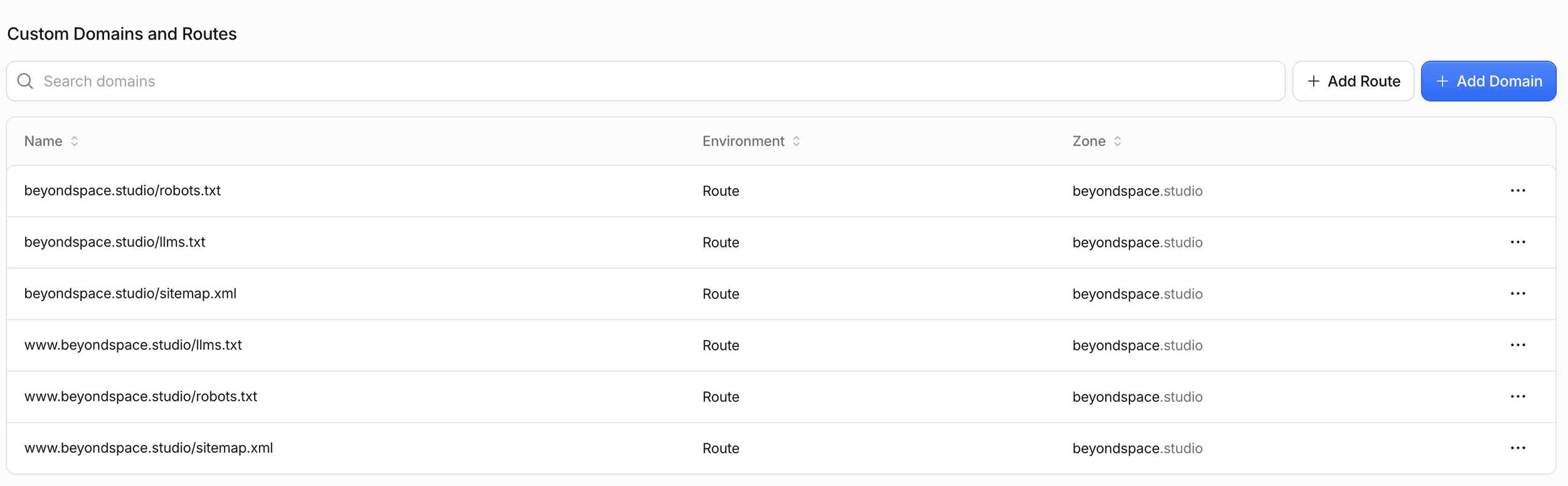
Saving Cloudflare worker routes
In your Worker view (squarespace-ai-discovery), navigate to Domains -> Add Domain / Add Route.
Bind the Worker to the specific paths for both your apex domain and www subdomain:
yourdomain.com/llms.txt
www.yourdomain.com/llms.txt
yourdomain.com/robots.txt
www.yourdomain.com/robots.txt
yourdomain.com/sitemap.xml
www.sitemap.xml
Save the routes.
Step 4: Enable logs & Verify Deployment
In your Worker view, go to Observability - Logs and make sure it is Enabled
Visit the the routes above from browser and confirm the llms.txt and robots.txt correctly
Initial Observations
Day 1: Semrush Alerts & Cloudflare Observability
On Day 1 of deployment, Semrush audit tools flagged the custom Content-Signal lines in robots.txt immediately as unrecognized directives. After reviewing technical documentation, these warnings are harmless—third-party SEO crawlers that do not support Content-Signal will simply ignore those lines without penalty.
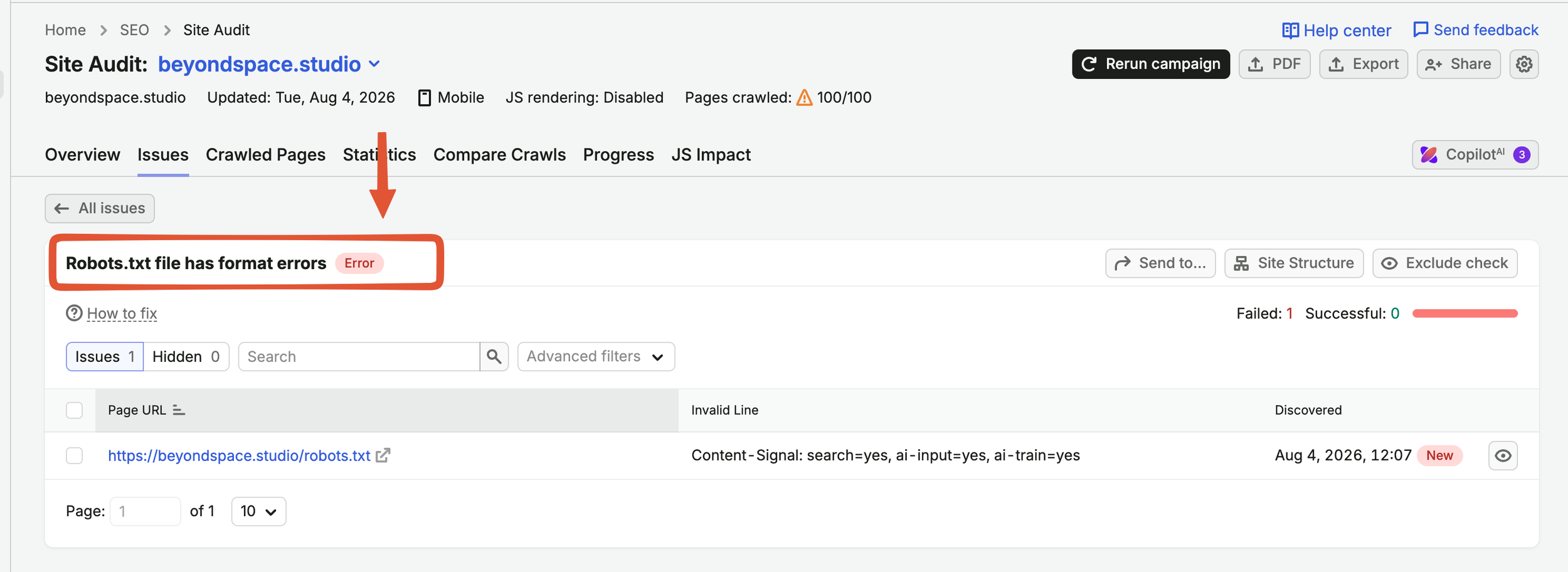
Semrush showing robots.txt error
Checking Cloudflare’s built-in observability analytics showed immediate activity:
Both robots.txt and sitemap.xml were being pinged multiple times per day by various AI scrapers and crawlers.
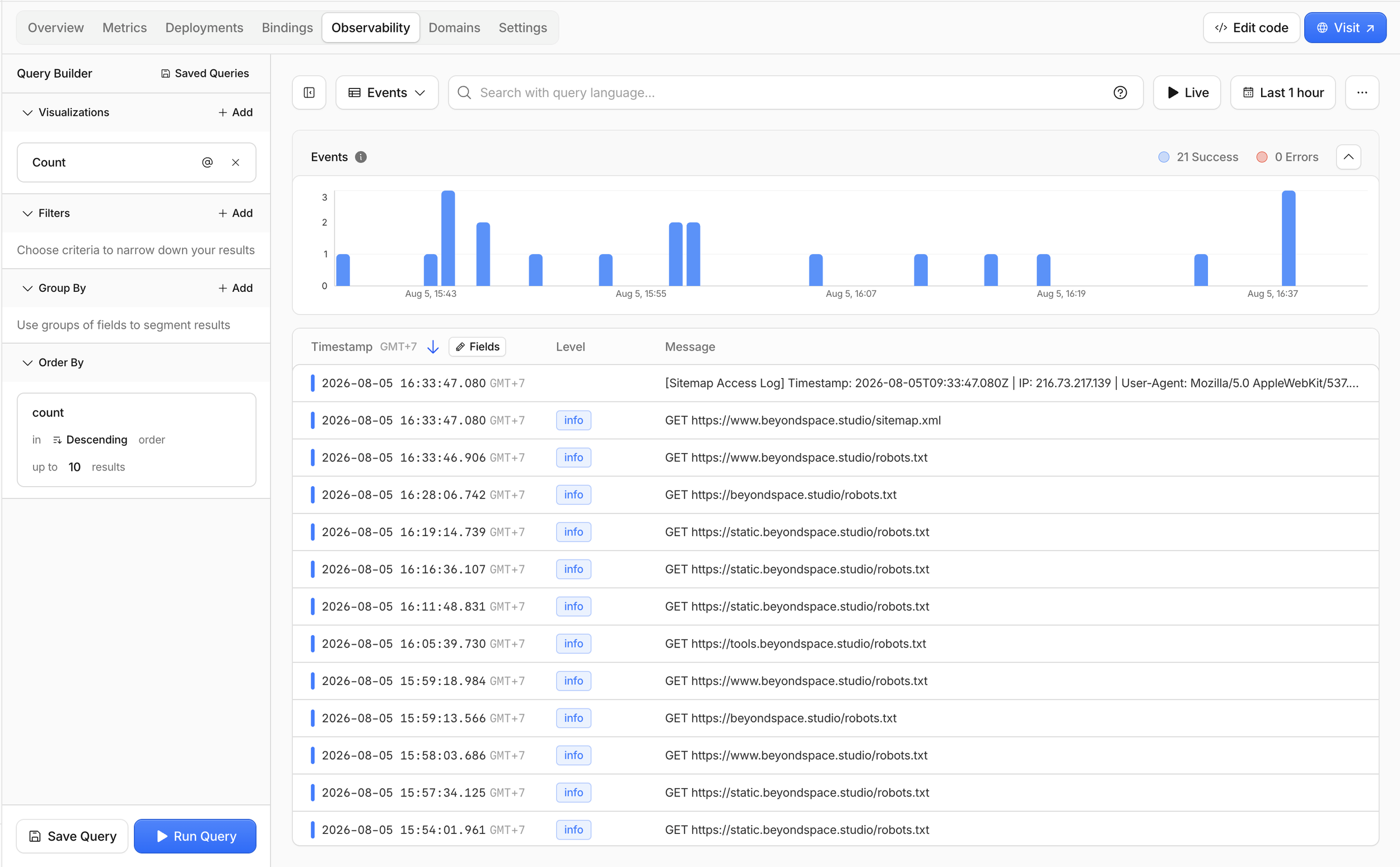
Tracking scraper with Cloudflare on Squarespace robots.txt
Note on subdomains: The initial logs revealed that attached subdomains were also triggering worker executions. I updated the routes (as shown above) to explicitly isolate traffic to www. and the main apex domain.
Day 3: Traffic spikes & crawler activity
By Day 3, site analytics showed a noticeable traffic spike accompanied by an increased bounce rate. This correlation confirms that automated AI scrapers and discovery bots were actively scanning the newly exposed endpoints and crawling site pages. All the IP addresses shown in this activity log belong to Amazon Web Services (AWS) in the us-west-2 (Boardman / Oregon, United States) region.
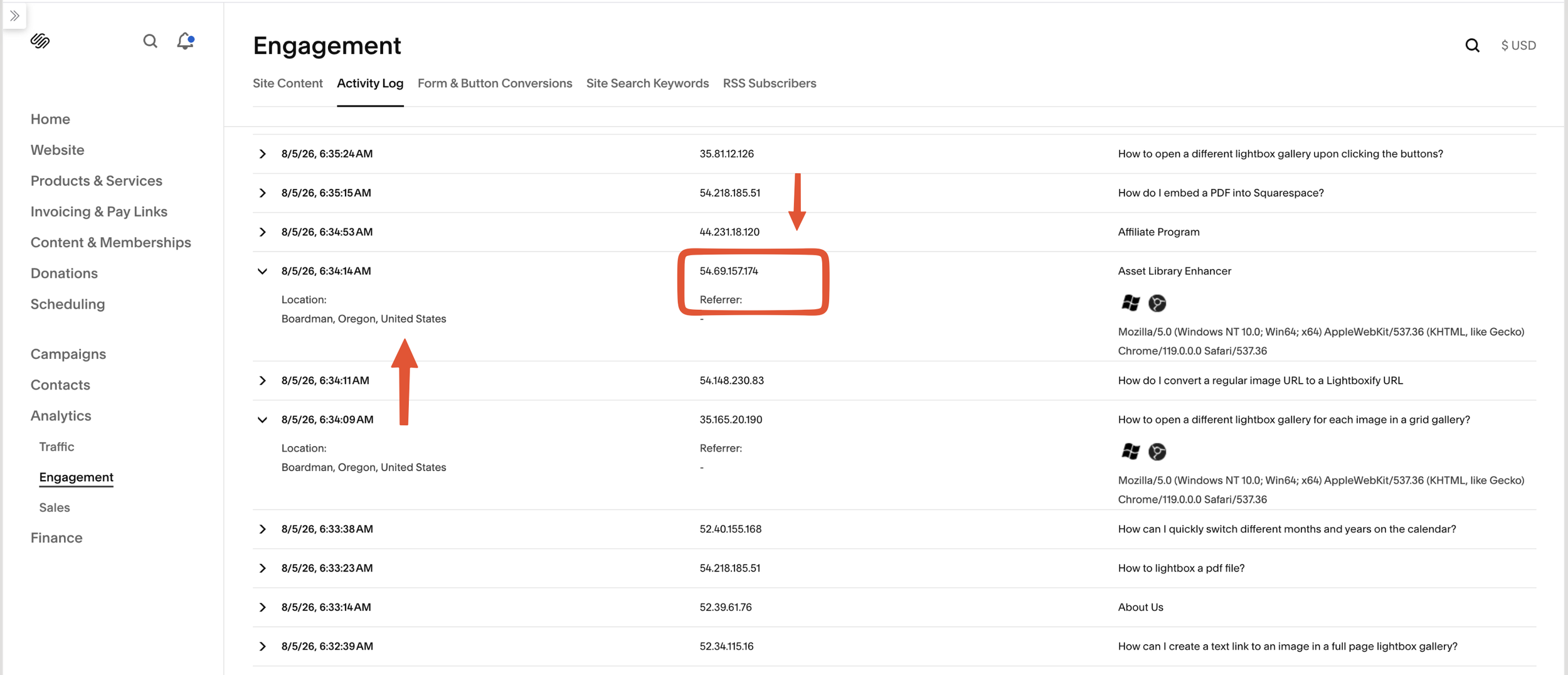
Bots traffic spike on Squarespace analytics
The visit spike is a bit scary in Squarespace analytics dashboard, lead to major bounce rate
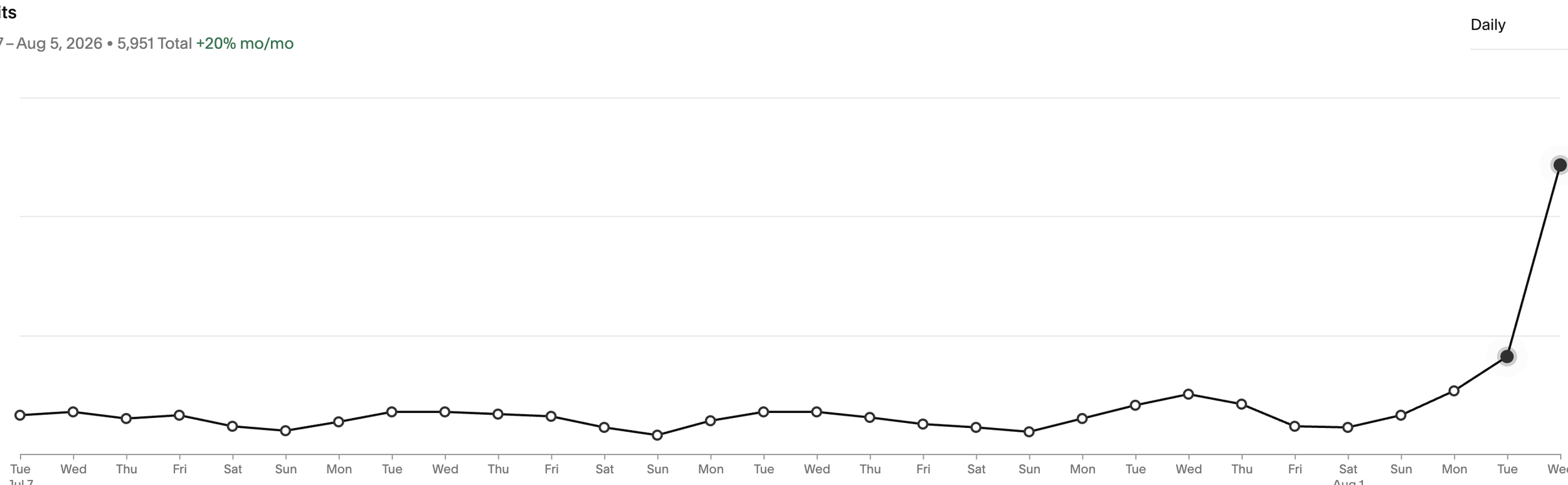
Bots traffic chart on Squarespace analytics
Temporary Conclusion
While native llms.txt support on Squarespace 7.1 is a welcome addition, using a Cloudflare Worker proxy provides complete control over header declarations, custom MIME types, and detailed crawler observability. We will continue monitoring traffic quality and citation metrics over the coming weeks.