
I’ve been obsessed with a specific technical hurdle lately: showing ultra-high-resolution images (4K and beyond) on Squarespace without the platform's 2500px compression killing the detail. Portfolios for traditional art or high-resolution photography are the most obvious use cases, but the need for "true" detail goes much deeper:
Fine Art & Conservation: Allowing collectors to inspect the impasto textures, delicate brushwork, and the raw canvas weave that define a masterpiece.
Architectural Visualization: Presenting massive site plans and schematics where every fine line and technical annotation must remain legible under scrutiny.
Commercial Macro-Photography: Showcasing the microscopic craftsmanship of luxury watches or high-end jewelry that 2500px images simply cannot capture.
What exactly is the Deep Zoom technique?
In short, Deep Zoom works by slicing an original high-resolution image into hundreds of small "tiles" and serving them only as needed. This allows your visitors to look closely at the fine patterns of an oil painting, the intricate lines of an architectural blueprint, the tiny text on a historical map, or the microscopic textures of luxury jewelry - all without decreasing the initial load speed of your site.
The image below compares the zoom quality between 2500px version of the image on Squarespace vs the origin file
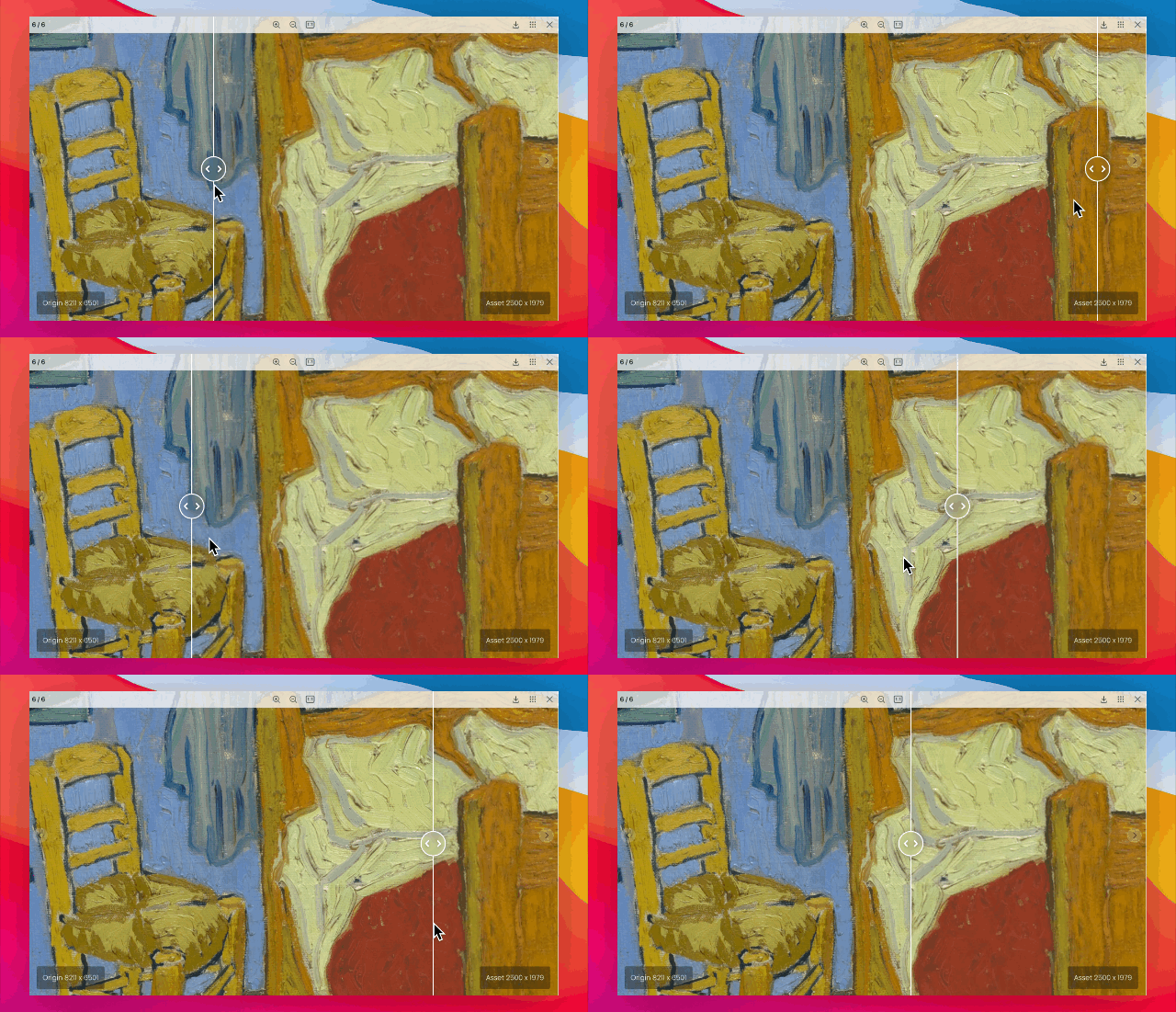
Deepzoom vs Squarespace images
Currently, if you want a "Deep Zoom" experience like Google Arts & Culture, you usually have to pay for a third-party service like Micrio (which costs over $800 USD annually, by the way) or host thousands of tiles yourself on AWS or Cloudflare. It’s expensive, highly technical, and feels like a total disconnect from the standard Squarespace workflow.
The Experiment
I’ve been testing a theory: Using a standard Gallery Block as a "tile store." We know Squarespace allows us to upload plenty of images, but we usually run into the 250-image limit per gallery. However, the math gets interesting if we change how we slice the images. If we use generator software to create 512px tiles (or larger) instead of the standard 256px, we can fit a massive high-res master into a single Gallery Block.
For example, the video below demonstrates an 8192 x 6144 image that has been sliced into 266 tiles at 512px each.
And another example here: 6144 x 8192 ~ 75 tiles 1024px
This means a massive artwork can live entirely inside one native Gallery Block without ever leaving the platform.
The Workflow
The idea is a simple three-step process. First, you generate the 512px tiles using any standard deep zoom software. Second, you upload that flat folder of tiles into a hidden Gallery Block on your site. Finally, a custom script/plugin targets that Gallery URL and initializes a viewer to map those images back into one seamless, zoomable experience.
Is the "Friction" Worth It?
I’m curious to hear from other designers and photographers here. Does the idea of managing your high-resolution assets directly through a Gallery Block sound like a good deal?
Beyond the art gallery, this native "hack" opens doors for:
Cartography: Interactive, high-detail historical or fantasy maps.
Fashion Design: Zooming into textile patterns and intricate embroidery.
Medical & Scientific Imaging: High-resolution scans that require zero-latency inspection.
Digital Archives: Preserving historical documents where the grain of the paper matters.
Large-Scale E-commerce: Allowing customers to see the serial numbers or minute quality markers on luxury goods.
If there’s enough interest in this method, I’d love to share more about the new paid plugin I'm developing to handle the deep zoom implementation natively on Squarespace.

May 2026: Bypass Squarespace compress limit at 2500px and display your work in seamless canvas in their original size
→ Check out the plugin